5 Reasons ‘Working’ Schematics Fail During PCB Layout
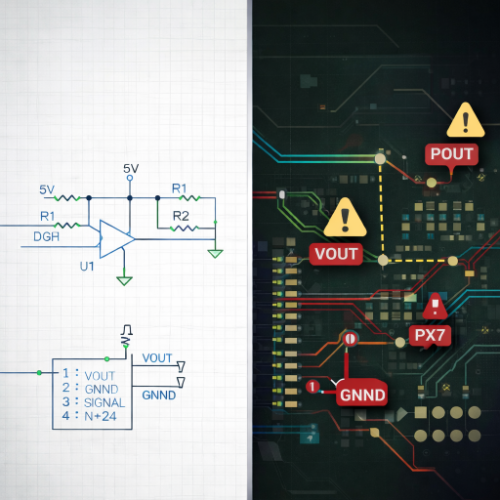
This article explains why schematics that appear correct can still fail during PCB layout, and how engineers can avoid connectivity errors, rework, and delays by improving schematic discipline early in the design process. Written by the AdvancedPCB engineering and manufacturing team, this guide focuses on net naming, power definition, connector clarity, and hierarchy, along with the practices that ensure a clean transition from schematic to layout.
A schematic can pass simulation, meet functional requirements, and still create major problems when translated into PCB layout. The issue is not whether the circuit works. The issue is whether the design intent is clearly and consistently defined for layout tools, manufacturing outputs, and downstream processes.
The Hidden Gap Between Schematic and Layout
PCB layout tools rely entirely on the schematic to define connectivity. If the schematic is ambiguous, inconsistent, or loosely structured, those issues are carried directly into layout, often surfacing as:
- Unconnected or incorrectly connected nets
- Power distribution errors
- Missing or misdefined pins
- Conflicting reference designators
- Layout rework due to unclear intent
These problems are rarely caused by routing. They originate in how the schematic was built.
1. Inconsistent or Ambiguous Net Naming
Net naming is one of the most common sources of layout failure. Nets that appear logically connected may not actually be connected if naming is inconsistent or relies on visual assumptions.
Examples include:
- Slight variations in naming (GND vs. GROUND vs. AGND)
- Implicit connections that are not formally defined
- Overuse of generic net labels
IPC-2221 emphasizes clear and consistent electrical definition across the design. Standardized naming conventions ensure that connectivity is interpreted correctly by layout tools and manufacturing outputs.
2. Poor Power and Ground Symbol Definition
Power and ground connections are often assumed rather than explicitly defined. Using multiple symbols for the same net without clear intent can create unintended isolation between power domains.
Common issues include:
- Separate ground symbols that are not actually connected
- Mixed analog and digital grounds without clear definition
- Hidden power pins not properly mapped
Without clear structure, layout tools may interpret these as separate nets, leading to functional issues that are difficult to diagnose later.
3. Incomplete or Unclear Connector Definitions
Connectors represent the interface between the PCB and the outside world, yet they are frequently underdefined in schematics. Missing pin assignments, unclear signal direction, or inconsistent labeling can create confusion during layout and assembly.
Typical problems include:
- Undefined pin functions
- Incorrect pin numbering or orientation
- Missing mechanical or interface details
Clear connector definitions ensure alignment between schematic, layout, and final system integration.
4. Lack of Hierarchical Structure
Flat schematics may work for simple designs, but as complexity increases, lack of hierarchy creates confusion. Without a logical structure, it becomes difficult to track signal flow, verify connectivity, and maintain consistency across the design.
Hierarchical design improves:
- Signal traceability
- Reusability of functional blocks
- Clarity for both design and review
IPC-2222 reinforces structured design practices for complex systems, supporting better organization and manufacturability.
5. Schematic That Passes Function but Fails Translation
A schematic can function correctly in theory but still fail when translated into layout if it lacks clarity, structure, or consistency. Layout tools do not interpret intent. They follow defined connectivity.
This is where many designs break. Not because they are electrically incorrect, but because they are not clearly defined for downstream use.
A Practical Checklist for Schematic Integrity
Before moving into layout, use this checklist to ensure your schematic is ready:
- Use consistent and standardized net naming conventions
- Clearly define all power and ground connections
- Verify all connector pin assignments and orientations
- Avoid implicit or assumed connections
- Organize schematics using logical hierarchy
- Ensure all symbols and components are fully defined
- Run electrical rule checks (ERC) and resolve all warnings
- Confirm that schematic intent matches expected layout connectivity
Supporting Better Schematic-to-Layout Translation
Avoiding these issues requires more than careful review. It requires a design environment that maintains alignment between schematic intent and PCB layout.
AdvancedPCB’s free PCB Artist software uses a schematic-driven workflow that preserves connectivity, enforces consistency, and reduces translation errors between schematic and layout. By keeping design intent intact from the start, engineers can avoid many of the issues that typically appear during layout.
Learn more or download PCB Artist here:
https://www.advancedpcb.com/en-us/tools/pcb-artist-software/
By focusing on net naming, power definition, connector clarity, and hierarchy, engineers can eliminate many of the issues that surface during layout, resulting in a smoother transition from PCB design to fabrication.
Related Posts
.png?resizemode=force&maxsidesize=1226)
The Role of Rigid-Flex PCBs in Aerospace & Defense Prototypes
Fiducials in PCB Manufacturing: Design Rules, IPC Guidance, and Best Practices