


Gerber Files for PCB Manufacturing
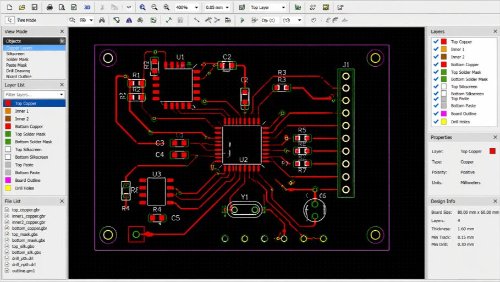
Gerber files are the manufacturing backbone of printed circuit boards (PCBs). They convert your PCB layout into machine-readable manufacturing files used to image copper, apply solder mask, print silkscreen, and communicate drilling and routing requirements. Whether you are building a quick prototype or scaling to production, clean, complete Gerber files help ensure your board is fabricated exactly as designed, on schedule, and within tolerance.
What Are Gerber Files?
Gerber files are standardized 2D vector image files that describe each physical layer and process step of a PCB. Every layer—copper, solder mask, silkscreen, paste stencil—along with board outline and drill locations, is output as its own Gerber or drill file so a fabricator can reproduce the stackup accurately. A clear gerber file example includes distinct files for each copper layer, separate mask and legend, and a defined outline.
In turning PCB designs into circuit boards, Gerbers are the final deliverable from CAD tools and the primary input for fabrication. While your CAD database manages components, nets, and rules, Gerbers express the resulting shapes, apertures, and coordinates that drive photoplotters and CAM systems on the production floor. When moving from gerber pcb design to production, being able to view gerber files and verify them independently is essential.
Gerber data may also be used alongside CAD data for stencil generation, panelization, and AOI setup. Contract manufacturers use these files to image and etch copper, apply solder mask, print legends, and align drills for products across consumer, industrial, medical, and aerospace applications. If you need to translate gerber to pcb reliably with your fabricator, consistent layer conventions and a robust gerber file format are critical.
Why Gerber Files Matter in Fabrication
Gerbers function as the common language between design and manufacturing. By standardizing layer content and coordinates, they reduce ambiguity and enable fast quoting and smooth release to production. For anyone preparing “gerber files pcb” packages, clarity and completeness are non-negotiable.
High-quality Gerbers improve yield and throughput. Fabricators import them into CAM tools to panelize, generate phototools, and run design-for-manufacturing (DFM) checks. Properly prepared files help avoid registration errors, missing solder mask openings, misaligned drills, and fine-pitch issues, supporting tight impedance and dimensional tolerances. Teams that routinely view gerber files before release catch issues early.
Conversely, incomplete or inconsistent packages are a frequent source of delays. Common problems include missing board outline, incorrect film polarity, mixed units, unreferenced apertures, and drill files without tool tables. These lead to CAM holds, scrap, or re-spins. A concise readme and a fabrication drawing (or IPC‑2581 supplement) can clarify intent, but robust Gerbers remain essential for smooth gerber to pcb transfer.
Gerber File Formats
RS‑274X (Extended Gerber) is the current industry standard. It embeds aperture definitions and supports attributes to carry metadata, making each file self-contained and widely accepted by fabricators. This gerber file format is recommended for all new jobs and is the backbone of most gerber pcb workflows.
RS‑274D (Standard Gerber) is legacy and separates geometry from aperture lists, requiring an external aperture file. Because this increases the chance of misinterpretation, it is not recommended for new designs.
Gerber X2 attributes extend RS‑274X by tagging each layer with its function (for example, top_copper, bottom_mask) and adding part information. X2 reduces ambiguity during CAM import, shortens setup time, and lowers the risk of layer mix-ups compared with older formats. If you need a gerber file example illustrating layer intent, X2 tags provide that clarity directly in the gerber file.
Generating and Managing Gerber Files
Adopt consistent practices when plotting from your PCB CAD tool:
- Use RS‑274X with consistent units (inches or millimeters) across all layers, ensuring the gerber file format matches drill data.
- Assign clear layer names such as TopCopper, In1Copper, BottomCopper, TopMask, BottomMask, TopSilk, BottomSilk, and BoardOutline for readable gerber files pcb packages.
- Output Excellon drill files with a complete tool table, separating plated (PTH) and non‑plated (NPTH) holes.
- Include the board outline on its own layer as a single, closed path; provide milling/slots on a mechanical layer if used.
- Set correct film polarity (positive for most layers) and mirror text appropriately on bottom layers.
- Maintain a consistent origin and coordinate format across all Gerber and drill files.
Most leading software tools provide CAM job templates for standard outputs. Enable X2 attributes where supported. For drill and route data, export Excellon with zero suppression and coordinate format matching your Gerbers to avoid alignment issues. This consistency makes the gerber to pcb process straightforward for your fabricator.
Before submitting, review the full package in an independent viewer such as Gerbv, KiCad’s Gerber viewer, Altium CAMtastic, or Ucamco’s online viewer. Verify layer-to-layer alignment, confirm solder mask clearances, check that silkscreen does not cover pads or vias, and ensure drills align with pads. Confirm NPTH holes are distinct from PTH, and that copper-to-edge clearances meet your fabricator’s rules. Include a readme that lists each file’s purpose, stackup order, finished board dimensions, copper weight, solder mask and silkscreen colors, surface finish, and any special instructions. Always view gerber files as a last check before release.
Recommended Gerber Package Contents
| File | Purpose |
|---|---|
| TopCopper.gbr, InXCopper.gbr, BottomCopper.gbr | Conductive layers and features |
| TopMask.gbr, BottomMask.gbr | Solder mask openings |
| TopSilk.gbr, BottomSilk.gbr | Component legends (if used) |
| TopPaste.gbr, BottomPaste.gbr | Stencil apertures (if requested) |
| BoardOutline.gbr | Finished board shape and routing path |
| Drill_PTH.drl, Drill_NPTH.drl | Plated and non‑plated holes with tool table |
| Mechanical.gbr (optional) | Slots, cutouts, and special routing |
A concise gerber file example includes all of the above with consistent naming and units, enabling fast intake by CAM engineers working on gerber pcb builds.
Naming and Documentation Tips
- Use explicit, human-readable names that match your readme. Avoid cryptic extensions or ambiguous abbreviations in any gerber file.
- If using X2 attributes, keep descriptive file names anyway for clarity during quoting and review.
- Provide a PDF fabrication drawing to communicate layer stackup, controlled impedance, tolerances, materials, and surface finish for your gerber pcb design.
- Include an assembly drawing for reference designators, polarity marks, and special notes to support downstream processes.
Gerber vs. ODB++ and IPC‑2581
Gerber describes each layer as 2D graphics and remains the most universally supported format for PCB fabrication. ODB++ and IPC‑2581 are richer, single-container formats that can include netlists, material data, and stackups. Many shops accept all three, but Gerber (RS‑274X/X2) offers broad compatibility, small file sizes, and straightforward CAM processing. IPC-2581 adoption continues to grow in highly complex manufacturing environments, but Gerber remains the most commonly accepted format across the industry. For most teams, standardizing on the gerber file format keeps the gerber to pcb handoff predictable.
Preventing Common Gerber Errors
- Keep a consistent origin and units across all layers and drill files.
- Use RS‑274X with embedded apertures; avoid RS‑274D for new designs.
- Enable and check X2 attributes where available to tag layer functions.
- Run DFM checks in your CAD tool for trace/space, annular ring, solder mask clearance, and copper-to-edge spacing.
- Review in an independent viewer before release and correct any polarity, mirror, or alignment issues.
- Consult your fabricator’s capability guidelines for minimums and controlled impedance requirements.
Following these practices ensures your gerber pcb design translates cleanly, letting your manufacturer quickly view gerber files, validate intent, and proceed from gerber files pcb intake to finished boards without delays.
Related Posts

Design Printed Circuit Boards Easily with Free Tools and Services

Gerber Files, Errors, and Free Tools to Avoid Them Now and Forever!
