


Schematic Insights for PCB Design Success
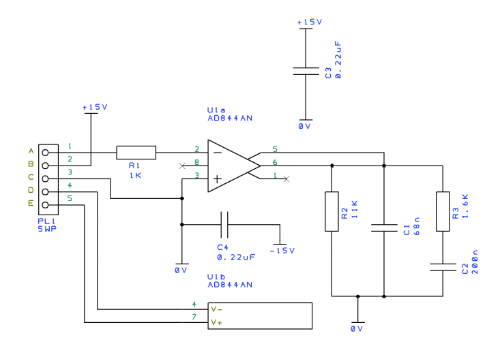
A schematic is a symbolic, simplified representation that shows how components in a system connect and interact. In electrical and electronic engineering, the schematic diagram captures design intent without physical layout details and serves as the authoritative reference from concept through production. Whether planning a new printed circuit board (PCB), validating a circuit idea, or maintaining a complex product, a well-crafted circuit schematic accelerates design, improves communication across teams, and prevents costly mistakes.
Understanding Schematics
A schematic diagram uses standardized symbols to represent functional relationships between components. Instead of depicting actual shapes, each part (resistors, capacitors, integrated circuits, connectors, and power rails) is shown as a clear symbol connected by lines for nets or signal paths. This abstraction makes the behavior of the circuit easy to analyze, review, and communicate.
Electrical schematics serve as the blueprint of an electronic design. Engineers use them to capture requirements, verify operation, and align across disciplines. Fabricators and assemblers rely on the electrical schematic to interpret the bill of materials (BOM) and understand constraints, while technicians use the schematic diagram to diagnose faults and validate repairs. By providing a common language, schematics shorten design cycles and speed collaboration.
Core elements include component symbols, nets that define electrical connections, reference designators (for example, R1, C5, U2) that tie to the BOM, and annotations for values, signals, and operating conditions. Larger systems often use hierarchical blocks or multiple pages to organize complexity. Clear titles, revision markers, and notes contribute to traceability and quality control.
Good practices ensure clarity and reliability. Keep signal flow left-to-right or top-to-bottom, use consistent net naming (for example, VCC, GND, CLK), and break complex designs into pages or hierarchical sheets. Document power domains and test points, include pin numbers and packages where relevant, and maintain readable formatting. These habits streamline downstream processes such as PCB layout, prototyping, and bring-up, and are fundamental to expert schematic design.
Types of Schematics
Electrical schematic diagrams are the most common format in electronics and power systems. They use standard symbols to represent circuits, from simple analog filters to high-speed digital interfaces and mixed-signal designs. An electrical schematic diagram prioritizes precision and unambiguous interpretation, supporting simulation, design rule checks (DRC), and manufacturing.
Pictorial schematics, often referred to as wiring diagrams, show components and connections in a more physical style. They are practical for installers and field technicians because they illustrate cable runs, connector orientations, and terminal positions. While less formal than an electrical schematic, they improve assembly and service accuracy for equipment and appliances.
Block diagrams provide a high-level view by grouping functions into labeled blocks connected by signal lines. They are ideal for early concept work and cross-functional communication, helping teams align on architecture before committing to detailed circuitry. Block diagrams often precede the creation of a full circuit schematic and are frequently used in product documentation.
Most projects benefit from combining all three: block diagrams for architecture, an electrical schematic diagram for implementation, and pictorial diagrams for installation and maintenance.
Applications in the Electronic Industry
Schematics guide everything from component selection to layout. PCB designers capture electrical intent and constraints, then generate the netlist that drives placement and routing. Clear schematic design reveals power distribution, timing relationships, and critical signal paths, enabling layout engineers to plan planes, decoupling, and controlled impedance routing. Modern EDA tools support forward and back annotation so changes in the schematic and layout stay synchronized, reducing mismatches and rework.
When a board fails or a system behaves unexpectedly, technicians rely on the circuit schematic to trace signals, measure nodes, and isolate faults. Clear net names, pin numbers, and accessible test points shorten debugging. Including expected voltages, reference waveforms, and diagnostic notes directly in the electrical schematic improves serviceability for complex mixed-signal designs.
Schematics enable communication among engineering, manufacturing, and quality teams. They support design reviews, safety assessments, and regulatory compliance by documenting isolation boundaries, protection circuits such as fuses and transient suppressors, and conditions that affect reliability. Early schematic design reviews catch conflicts like incompatible logic levels, insufficient power margins, or missing pull-ups before they require expensive re-spins.
How to Create an Effective PCB Schematic
Creating a high-quality PCB schematic is both a technical and organizational task. Following a structured approach helps ensure accuracy, readability, and seamless transition to layout and manufacturing.
- Define requirements and architecture: Start with a block diagram to clarify functions, interfaces, power domains, and constraints. Identify key components early, including regulators, processors, memory, and connectors.
- Establish standards and libraries: Use vetted symbol and footprint libraries. Confirm pin mappings, packages, and electrical characteristics. Standardize reference designators, value formatting, and net naming conventions to ensure a robust electrical schematic.
- Place functional blocks: Organize the schematic by function (power management, digital logic, RF, analog front-end). Maintain logical signal flow from inputs to outputs to aid readability and review.
- Name nets consistently: Use clear names (for example, 3V3, GND, I2C_SCL, USB_D+) and avoid ambiguous labels. Document power rails, sequencing requirements, and protection elements in the circuit schematic.
- Annotate thoroughly: Add component values, tolerance notes, pin numbers, and operating conditions. Include notes for test points, safety, and measurement references. Provide cross-references between hierarchical sheets.
- Design for manufacturability: Align reference designators with the BOM structure. Include alternatives and approved vendors where applicable. Consider assembly notes for polarity, orientation, and inspection.
- Verify with rules and simulation: Run electrical rule checks (ERC) and design rule checks (DRC). Use simulation to validate regulators, filters, and timing where needed. Confirm power integrity and signal integrity constraints.
- Review collaboratively: Hold schematic design reviews with stakeholders across design, layout, test, and procurement. Check for clear grounding, decoupling placement guidance, and interface compatibility.
- Maintain revision control: Track changes, document rationale, and align revisions with layout updates using forward and back annotation.
Key Elements of a Quality PCB Schematic
| Element | Purpose | Best Practices |
|---|---|---|
| Symbols and Libraries | Represent components accurately | Use verified symbols; confirm pinouts and packages |
| Reference Designators | Link components to the BOM | Follow a consistent scheme (R, C, U, J); avoid duplicates |
| Net Naming | Identify connections and signals | Use descriptive names; document power rails and clocks |
| Annotations and Notes | Convey values and operating details | Include tolerances, test points, expected measurements |
| Hierarchy and Pages | Organize complex systems | Group by function; cross-reference signals across sheets |
| Power and Ground | Define distribution and returns | Label domains; note sequencing, protection, and filters |
| Revision Control | Maintain traceability | Use titles, version markers, and change logs |
Frequently Asked Questions
What is a schematic used for? A schematic defines and communicates how a system works at the electrical or functional level. It guides PCB layout, supports simulation and verification, aids troubleshooting, and provides documentation for manufacturing and maintenance. An electrical schematic diagram is the foundation for reliable product development.
How do you read a schematic diagram? Begin by locating power rails and ground, then follow the signal flow through functional blocks. Read reference designators alongside component values and pin numbers. Use net names to trace connections and consult annotations for operating conditions. Practice with common circuits such as voltage regulators, op-amps, and logic gates to recognize patterns and typical configurations.
What is the difference between a schematic and a wiring diagram? A schematic uses abstract symbols to show functional relationships, emphasizing how a circuit operates. A wiring diagram (pictorial schematic) shows physical connections, wire colors, and terminal locations, emphasizing assembly and service procedures. A circuit schematic is best for design and analysis, while wiring diagrams are best for installation.
Are schematics necessary for small projects? Yes. Even simple designs benefit from a schematic diagram. It prevents mistakes, simplifies debugging, and makes it easier to share, revise, or scale the project. Modern EDA tools make schematic capture fast and reusable for all levels of schematic design.
Which tools are commonly used to create schematics? Popular options include Altium Designer, KiCad, OrCAD/Allegro, Autodesk Fusion 360 with Eagle, and DipTrace. These tools offer symbol libraries, rule checks, netlist export, and integration with PCB layout. Choose a platform that fits team workflows, collaboration, and data management needs for your electrical schematic.
How do schematics connect to manufacturing? The schematic drives the BOM and netlist, which feed PCB layout, fabrication files, and assembly data. Accurate reference designators, values, and annotations in the electrical schematic diagram ensure correct sourcing and placement, reduce build issues, and speed production.